Project · Brainrot content
A sheet row in, a brainrot reel out
Peter in Tech turned tech topics into “brainrot” explainer reels: two cloned voices chatting over Minecraft parkour. An n8n workflow made every one.
Each reel is a short conversation. S asks the question you were too shy to ask, and P explains it with an everyday example. I picked a topic and put Claude's script in a Google Sheet. An n8n workflow did the rest: the voices, the footage, the edit and the render.
The problem
Tech explainers are dry, and editing them takes hours
Short videos that explain AI and tech terms are useful, but most are a talking head reading definitions. The brainrot format, two characters chatting over gameplay footage, is built to keep people watching.
Making one by hand means recording two voices, cutting every line to the footage and adding the speakers, every single time.
Why I built it
Could a channel run on a spreadsheet?
I wanted to see how far automation could go: if I only chose the topics, could a channel make its explainers on its own? Peter in Tech was the test, covering AI agents, RAG, MCP, vector databases and tech news.
How it works
From a sheet row to an MP4 in five steps
n8n, a workflow tool running on my laptop, is the conductor. It reads the sheet, calls each service in turn, waits for the render and writes the result back.
-
You
Pick a topic and paste Claude's script into the sheet.
-
n8n
Runs all 16 steps, one reel per run.
-
Script Claude
A two-voice dialogue of 18 to 30 lines: S asks, P explains. Plus a caption for the post.
SWait so everyone keeps saying AI agents like it means something different every time. What actually IS an AI agent?
POkay so imagine you hire an intern. Not a very smart intern. But they can use a computer, browse the web, send emails, and make decisions.
// The first two lines of reel 001, “What are AI agents?” -
Queue Google Sheets
One row per reel: topic, script, caption and status. n8n takes the next row marked ready, and marks it completed with the video link when it's done.
Reel Topic Words Status 002 What are RAGs 224 completed 003 What are MCPs 240 completed 005 Fine-tuning vs RAG 241 completed 008 CORS error explained 299 completed 011 Kunal Shah leaves CRED 403 completed // Five of the 11 rows in the real content sheet. -
Voices FFmpeg · Coqui
Coqui, an open-source speech model on my laptop, clones two voices from short reference clips and speaks every line as S or P: one audio file per line.

// Every line, spoken in S's or P's cloned voice. -
Visuals Cloudinary
One of 11 Minecraft parkour clips, picked at random for each reel, plus the artwork for S and P.
-
Render Remotion · FFmpeg
Remotion builds the video in React, scene by scene. Each scene lasts exactly as long as its line of audio and shows whoever is speaking. FFmpeg encodes the MP4, and the sheet row is marked completed.
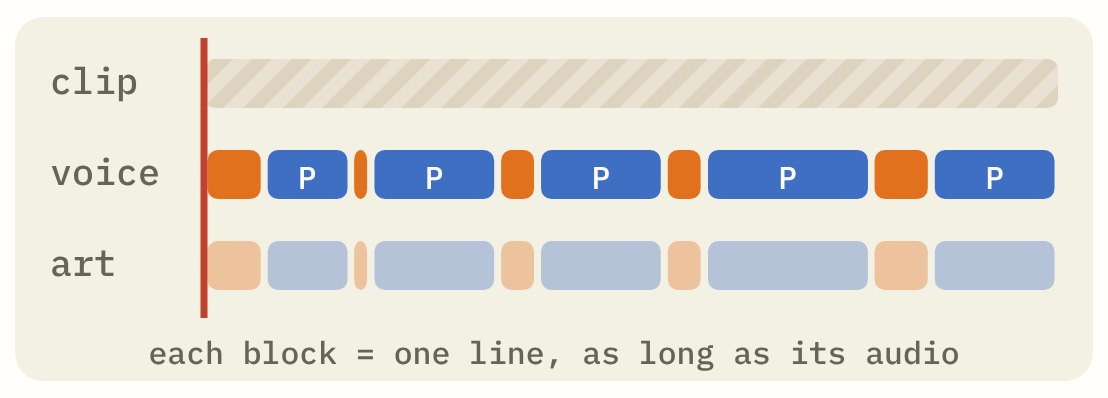
// One block per line: the clip runs underneath, the voice and speaker switch on top.
What happened
11 reels, then a pause
The workflow rendered 11 reels in June 2026, seven of them in under an hour. It worked, but it wasn't fully hands-off: topics and scripts still went in by hand, and every service ran on my laptop, so the laptop had to be on for a reel to get made. The channel is paused for now.
More from the archive
 Jai Hanuman App
A daily Chalisa and jap app whose voice follows you as you pray.
Try the app →
 AI Animated Mythology Reels
A story idea in, a 2D animated reel out, with every character drawn in code.
Read how →
 McDonald's India Growth Study
Why McDonald's India stalled, and 25 ideas to win back dine-in, digital and trust.
Read the study →